What is Triggerbox?
A Triggerbox is a special zone in the map editor that runs code when a player walks into it. You can use them to create interactive features, game rules, and unique world effects.
How to Use Triggerbox
To start, select a Triggerbox in the map editor. First, choose a mode (when the code
should run, like "on enter").
Then, you can add an action (what should happen, like repairing a car vehicle{repair}).
If you want even more control, you can add conditions so the code only runs for certain
players or at certain times.
Alternatively, you can use the Triggerbox Builder.
It automatically generates the correct syntax so you can easily copy and paste it directly into your map.
Quick Tip: Finding Commands
Scroll down to the Documentation Hub to find specialized tabs for everything from Physics and NPCs to Advanced Audio and Cinematic Camera controls!
Single Function
Create simple codes for your objects and actions.
Multi-Command
Build complex codes with multiple steps and conditions.
Single Function Builder
Generate triggerbox codes easily.
Documentation Hub
Explore the specialized categories of the Triggerbox Hub:
Core & Logic
Player & Inventory
World & Environment
NPCs
Control non-player characters and their behaviors.
Visual Effects
Particles, explosions, and visual feedback.
Visual Drawing
Draw icons, halos, and indicators on-screen.
Minimap
Custom map markers and blip icons.
Audio
Play music, SFX, and localized sound effects.
Cinematics
Camera controls and cinematic sequences.
Modes
Triggerbox has modes which modify the way it executes:
enter- makes the code box run only when the player collides with it.exit- makes the triggerbox run only when the player stops colliding with it.onclick- causes the triggerbox to execute only when the player clicks on it with a finger.solid- makes the triggerbox solid and runs when you shoot it.stay- makes the code box run only when the player is colliding with it.loop- makes the code box run 120 times per second (frame dependent), i.e. always.
Pro-Tip
Using the solid mode with any condition will make the triggerbox detect vehicle collisions with the triggerbox.
If-Conditions
Triggerbox conditions allow you to execute commands only when specific game states are met. You can combine multiple conditions using operators.
Operators & Logic
=equals to>more than<less than!=not equals to&&AND (all conditions must be true)
Environment
- time=0-360/day/night - Executes at certain game hour or day/night.
- weather=clear/rain - Executes based on active weather.
- radius=0-999 - Executes if player is within a certain radius.
- playercount=count - Executes if the room has a certain number of players.
Player Identity
- playername=name - Executes if player has a specific name.
- playerid=number - Executes if player has a certain ID.
- role=rolename - Executes if player has a certain role (e.g., admin).
- team=any/blue/red - Executes if player is on a certain team.
- mask=0-14 - Executes if player is wearing a certain mask.
- skinid=0-8 - Executes if player has a certain skin ID.
Player State
- health=0-100 - Executes based on player health level.
- isfemale=true/false - Executes if player skin is female.
- ishost=true/false - Executes if player is the room host.
- islocal=true/false - Executes if player is local to the instance.
- isragdoll=true/false - Executes if player is in ragdoll state.
- issitting=true/false - Executes if player is sitting.
- iscrouching=true/false - Executes if player is crouching.
- isdrunk=true/false - Executes if player is drunk.
- israce=true/false - Executes if a race is currently active.
- hashelmet=true/false - Executes if the player is wearing a helmet.
Physicality
- playerheight=0-999 - Executes if player is at a certain Z-height.
- playerrotation=0-360 - Executes if player is facing a certain rotation.
- speed=count - Executes based on player movement speed.
- flytimer=amount - Executes based on active flight time.
Combat
- weapon=0-6 - Executes if player is holding a specific weapon.
- kills=count - Executes if player has reached a kill count.
- isaiming=true/false - Executes if player is aiming.
- isshooting=true/false - Executes if player is shooting.
- isreloading=true/false - Executes if player is reloading.
- magcount=count - Executes based on ammo in current magazine.
- ammocount=count - Executes based on total reserve ammo.
Vehicle
- isinvehicle=true/false - Executes if player is in any vehicle.
- isdriver=true/false - Executes if player is the driver.
- isvehicleowner=true/false - Executes if player owns the vehicle.
- vehiclemodel=model - Executes if player is in a specific model (e.g. Marock).
- vehiclehealth=0-1000 - Executes based on vehicle health.
- fuel=0-1000 - Executes based on vehicle fuel level.
- ishonking=true/false - Executes if driver is using the horn.
- isintaxi=true/false - Executes if vehicle is a taxi.
- hassiren=true/false - Executes if vehicle has siren active.
- vehiclecount=count - Executes based on total vehicles in room.
Actions & Phone
- chat=text - Executes if player types specific text.
- emote=emote - Executes if player is doing a certain emote.
- interactionmenuclick=button - Executes if a specific menu button is clicked.
- isholdingphone=true/false - Executes if player has phone out.
- phonemenu=menu - Executes if player is on a specific phone menu.
- dial=number - Executes if player dials a specific number.
Objects & Inventory
- inventory:item=value - Executes if player has X amount of an item.
- hasheistbag=true/false - Executes if player has heistbag on.
- objectname=name - Executes if specific object is detected nearby.
- cargoname=name - Executes if specific cargo is detected.
Fun & System
- dice=1-6 - Executes if player rolls a specific dice number.
- coin=heads/tails - Executes based on coin flip result.
- cammode=0-3 - Executes if player is in a specific camera mode.
- framerate=amount - Executes based on player's FPS.
- ping=amount - Executes based on player's network ping.
- solidercount=count - Executes based on number of Rifle NPCs.
- zombiecount=count - Executes based on number of Zombies.
Pro-Tip
Conditions are great for creating shared map events. By using
ifcondition{global_float_a>100}, you can make something happen for everyone in the map
once a team goal is reached.
And you can also use conditions with tags, like ifcondition{global_string_h=[playername]} to make something happen for a specific player and be dynamic.
Player Effects
Modify player properties and states:
- trap - The player gets trapped inside the triggerbox
- damage*1-100 - Removes health from the player
- heal*0-100 - Gives health to the player
- invincible*true/false - Makes the player become invincible to collisions (does not protect from explosions or players bullets)
- respawn - Makes the player respawn
- respawntimer*time - Changes the respawn time
- nophone - Blocks the player's phone
- cammode*0/1/2/3 - Changes player camera
- race - Starts a race inside a vehicle
- race*foot - Starts a race outside a vehicle
- emote*name - Makes the player do certain emote
- team*red/blue/free/text - Makes the player be in a certain team
- role*rolename - Makes the player have certain role
- mask*0-14 - Makes the player have certain mask
- spawn&drive*vehmodel - Spawns a vehicle and makes the player drive it
- drive*seatid - Moves the player to a seat in their current vehicle
Pro-Tip
Use cammode*1 (First Person) inside narrow interiors or horror sections to make the gameplay feel claustrophobic and intense, then revert to cammode*0 (Third Person) on exit.
Vehicle Effects
Control vehicle behavior and properties:
- paint*r,g,b - Change the colour of the vehicle (only works in RGB red green blue)
- damage*0-1000 - Change the status of the vehicle, specifically damage (use +/- to add)
- fuel*0-1000 - Change the fuel level of the vehicle (use +/- to add)
- alwaysdrift*true/false - Makes the vehicle always drifting or not (default is false)
- arcadedriving*true/false - Makes the vehicle always in arcade driving or not (default is true)
- downforce*0-100 - Fixes the vehicle's downward force of gravity on each wheel
- headlights*on/off - Turns on/off the vehicle's headlights
- lock*true/false - Blocks/Unlocks the vehicle
- alarm*time - Enables vehicle's alarm for a certain amount of time
- repair - Repairs the vehicle
- ghost*time - Makes the vehicle invisible/ghost for a certain amount of time
Pro-Tip
Use a cooldown{} when uses vehicle commands to prevent
spamming and breaking the game.
Inventory
Manage player inventory items:
- add*item*value - Adds an item with a certain value on your inventory (use +/- to add)
- del*item - Deletes the item from your inventory
Pro-Tip
It's a good idea to check if a player has an item before trying to take it away. Use
ifcondition{inventory:item > 0} to make sure your script only runs when the player
actually has the item. Also, note that there is a hard inventory limit of 32 items in Los Angeles Crimes.
NPC Control
Control NPC behavior and interactions:
- npckill{} - Kills the npc
- npcanimation{name} - Makes the npc do certain animation
- npcposition{x,y,z} - Changes the position of the npc
- npcrotation{x,y,z} - Changes the rotation of the npc
Pro-Tip
If use npcanimation{} and lookat{} correctly, it will make the npc look at the player.
Teleport
Move players between locations:
- x,y,z - Teleports the player to a certain location with a delay of 1.5 seconds
- x,y,z*seconds - Teleports the player to certain coordinates with modifiable delay
- x,y,z*seconds*true - Teleports the player to a certain location with a modifiable delay with or without effect
Pro-Tip
Hide the interior far away from the player, then use teleport{} function to move them into that interior; this will help the map run smoothly without lag.
Effects
Visual and audio effects:
- reverbzone*radius*prefix - Defines echo in certain areas
Values: generic, padded cell, room, bathroom, livingroom, stoneroom, auditorium, concerthall, cave, arena, hangar, carpetted hallway, hallway, stone corridor, alley, forest, city, mountains, quarry, plain, parkinglot, sewerpipe, underwater, drugged, dizzy, psychotic - camerashake*0-1 - Shakes the game camera
- flash - display flickering (only works in enter or exit mode)
- slowmo*time - Slow down time for certain seconds
- lookat*x,y,z*time - The camera looks at the player from a certain area for a certain number of seconds
- fog*0-100 - Adds fog to the ambient (if you add 100, you will see nothing)
- skycolor*r,g,b - Changes the sky's color (affects the ambient color aswell, default is 0,0,0)
- steam - Adds steam to the ambient (it is affected by gravitational attraction)
- steam_small - Adds smaller steam to the ambient (it is affected by gravitational attraction)
- drunk - The player gets drunk for 2 minutes
- drunk*seconds - The player gets drunk for certain seconds
Pro-Tip
To create a scary/nighttime atmosphere in zombie maps, set skycolor*0,0,0 (pitch black) and combine it with fog*85. This creates a low-visibility horror setting.
Weapons
Weapon-related functionality:
- refill - Refills all weapons ammo
- refill*1/2/3/4/5/6 - Refills certain weapon ammo
(1 = pistol M9 | 2 = rifle ar15 | 3 = shotgun m1014 | 4 = sniper awsm | 5 = rifle akm | 6 = submachine uzi) - empty - Empties all ammo of guns
- empty*1/2/3/4/5/6 - Empties ammo of certain gun
(1 = pistol M9 | 2 = rifle ar15 | 3 = shotgun m1014 | 4 = sniper awsm | 5 = rifle akm | 6 = submachine uzi) - 1/2/3/4/5/6 - selects certain weapon
Pro-Tip
You can create a fully functional weapon shop using conditions! Use ifcondition{inventory:cash>500} to verify funds, deduct the price with add*cash*-500, and grant the weapon (e.g. 2 for AR15) followed by refill*2 to supply ammunition.
Game Mechanics
Core game system modifications:
- interactionmenu{allow/block/value} - Blocks or makes a certain menu
accessible
(values: mainmenu, actions, inventory, accessories, personalvehicle, requestvehicle, vehiclestatus, serveroptions, roleselect) - sound{name/link*volume*distance*true/false} - Reproduces a sound with certain volume and distance
- setspawn{x,y,z} - changes the point of appearance at a certain position (if you leave it blank, it will appear on triggerbox position)
- transform{(objectA)x,y,z*(objectB)x,y,z*speed*true/false} - Moves objects from point A to point B at a certain speed or not
- rotate{(objectA)x,y,z*(objectB)x,y,z*speed*true/false*delay} - Rotate the object from point A to point B at a certain speed or not (ping pong)
- lookat{(objectA)x,y,z*(objectB)x,y,z*speed*offset*axis} - The triggerbox makes an
object
look at another object with a custom speed, offset and axis
(offset is like an area that the object cannot see, axis blocks the object from lookin in a certain axis, for example up an down) - spawn{objectname*(coords)x,y,z*(rotation)x,y,z} - Makes an object appear with custom coords and rotation (example: Fire_)
- despawn{objectname} - makes an object dissapear (example: Npc_Ped2)
- scale{(coords)x,y,z*(rescale)x,y,z*speed*true/false} - The triggerbox scales certain object at a certain speed or not
- spread{radius} - The triggerbox executes at different positions within a certain distance
- tip{text} - Makes a text appear at the bottom
- header{text} - Makes a text appear up the screen
- outro{text} - exits the map with custom outro
- chat{text} - makes the player send a message
- gravity{x,y,z} - Changes game's gravity (default is 0,-9.8,0, and only works on solo)
- time{day/night/0-360} - Changes the game time
- weather{rain/clear} - Changes the weather
- executeplayer{} / executeplayer{ObjectName}
- Triggers the command box for all players.
- If brackets are empty
{}, it functions with all players/objects. - If specified
{ObjectName}, the command box will execute when that selected physical object enters it.
Important Notes:
? Only works with objects that have physics (NPCs, tires, balls, boxes, etc.).
? Will not trigger anyifcondition{}statements.
? Themode{}should be set to either enter, stay, or exit to function properly. - If brackets are empty
- explode{x,y,z} - The triggerbox generates a explosion in a certain given position (if leave blank, it will explode on triggerbox pos)
- cooldown{seconds} - The triggerbox is only executed once every few seconds (e.g. cooldown{60})
- deactivate{seconds} - The triggerbox is desactivated when executed within certain seconds or instantly
Pro-Tip
To keep your server running smoothly, add a small cooldown to any loop
triggerbox. A tiny delay like 0.1 keeps the game fast without changing how your script
feels.
Cinematics
Cutscene and cinematic controls:
- camsequence{seconds:(coords)x,y,z:(rotation)x,y,z} - Teleports and rotates the
camera
(if you want to add more sequences put a * at the end of the rotation, e.g.: camsequence{(sequence1)seconds:x,y,z:x,y,z*(sequence2)seconds:x,y,z:x,y,z}) - camtranslate{seconds:(coords)x,y,z:(rotation)x,y,z} - Moves and rotates the
camera
(if you want to add more sequences put a * at the end of the rotation, example: camtranslate{(sequence1)seconds:x,y,z:x,y,z*(sequence2)seconds:x,y,z:x,y,z})
Pro-Tip
Use camtranslate with a slow timer (like 10 seconds) to create smooth, cinematic camera
moves for your map intro.
Visual Drawing
Draw visual indicators and icons on the screen using draw{type}. Click any card to
copy its syntax!
Halo Colors
-
Blue Halo
draw{halo}Red Halodraw{halo1}Green Halodraw{halo2}Orange Halodraw{halo3}
Weapon Icons
-
M9
draw{weapon1}AR15draw{weapon2}AWSMdraw{weapon3}M1014draw{weapon4}AKMdraw{weapon5}UZIdraw{weapon6}
Vehicles
Cars
-
Blue Car
draw{car}Red Cardraw{car1}Green Cardraw{car2}Orange Cardraw{car3}
Bikes
-
Blue Bike
draw{bike}Red Bikedraw{bike1}Green Bikedraw{bike2}Orange Bikedraw{bike3}
Helicopters
-
Blue Heli
draw{helicopter}Red Helidraw{helicopter1}Green Helidraw{helicopter2}Orange Helidraw{helicopter3}
Miscellaneous
Houses
-
Blue House
draw{house}Red Housedraw{house1}Green Housedraw{house2}Orange Housedraw{house3}
Magic Smoke
-
Blue smoke
draw{magic_smoke}Orange smokedraw{magic_smoke1}Green smokedraw{magic_smoke2}White smokedraw{magic_smoke3}
Utilities
-
Wrench
draw{wrench}Wrench 1draw{wrench1}Wrench 2draw{wrench2}Wrench 3draw{wrench3}Jerrycandraw{jerrycan}First Aiddraw{health}Keydraw{key}Moneydraw{dollar}
Food
-
Wine
draw{bottle_wine}Burgerdraw{hamburger}
Pro-Tip
Visual drawing elements like Halos are client-side. Can use them to highlight quest items or interactive objects.
Advanced
Advanced triggerbox features:
- calltriggerbox{(coords)x,y,z*seconds} - Teleports a code box to the player within a certain time or instantly
- webrequest{link} - Opens an external link, it will ask you if you wanna open it
- webrequest{link*GET} - Grabs the link data and sends it to the game chat
- webrequest{link*POST*format*format} - triggerbox opens the external link and sends a post to a certain database
- ban{reason} - Bans the player from the server with an optional reason
- kick{reason} - Kicks the player from the server with an optional reason
Global Variables
There are 10 global variable slots available that are synchronized across all players:
Floats
global_float_aglobal_float_bglobal_float_cglobal_float_dglobal_float_eglobal_float_fglobal_float_gglobal_float_hglobal_float_iglobal_float_jglobal_float_kglobal_float_l
Strings
global_string_aglobal_string_bglobal_string_cglobal_string_dglobal_string_eglobal_string_fglobal_string_gglobal_string_hglobal_string_iglobal_string_jglobal_string_kglobal_string_l
Management
- Set:
globalvar{set*var*val} - Add (Floats):
globalvar{add*var*val}
Reading Variables
You can read these variables in: servername, tip{}, header{},
ifcondition{}, webrequest{}, transform{},
UI_Scalable,
blackboard, and chat.
header{your score is global_float_a}
ifcondition{global_float_a>10}
globalvar{} on fast loops! It will spam
network
messages and break the game. Use cooldown{1} to slow down the update rate to 1 per second
instead of 120.
Pro-Tip
Global variables are shared across all players in the map. Use them for synchronized team scores, world-state toggles, or community goals that everyone contributes to.
Minimap
Minimap controls:
- minimap{icon*X,Y} - Place an icon at trigger-box position using UV coordinates from the minimap texture sheet.
- minimap{icon*X,Y*posX,posY} - Place an icon at a specific map position (X, Y).
- minimap{icon*X,Y*attach} - Create an icon and follow the trigger-box.
- minimap{route*X,Y} - Draw a route to fixed game coordinates (X, Y).
- minimap{route*0,0} - Clear the active waypoint/route.
- minimap{clear} - Remove all minimap icons.
Blips Reference
Click on an icon to get its UV coordinates and syntax.
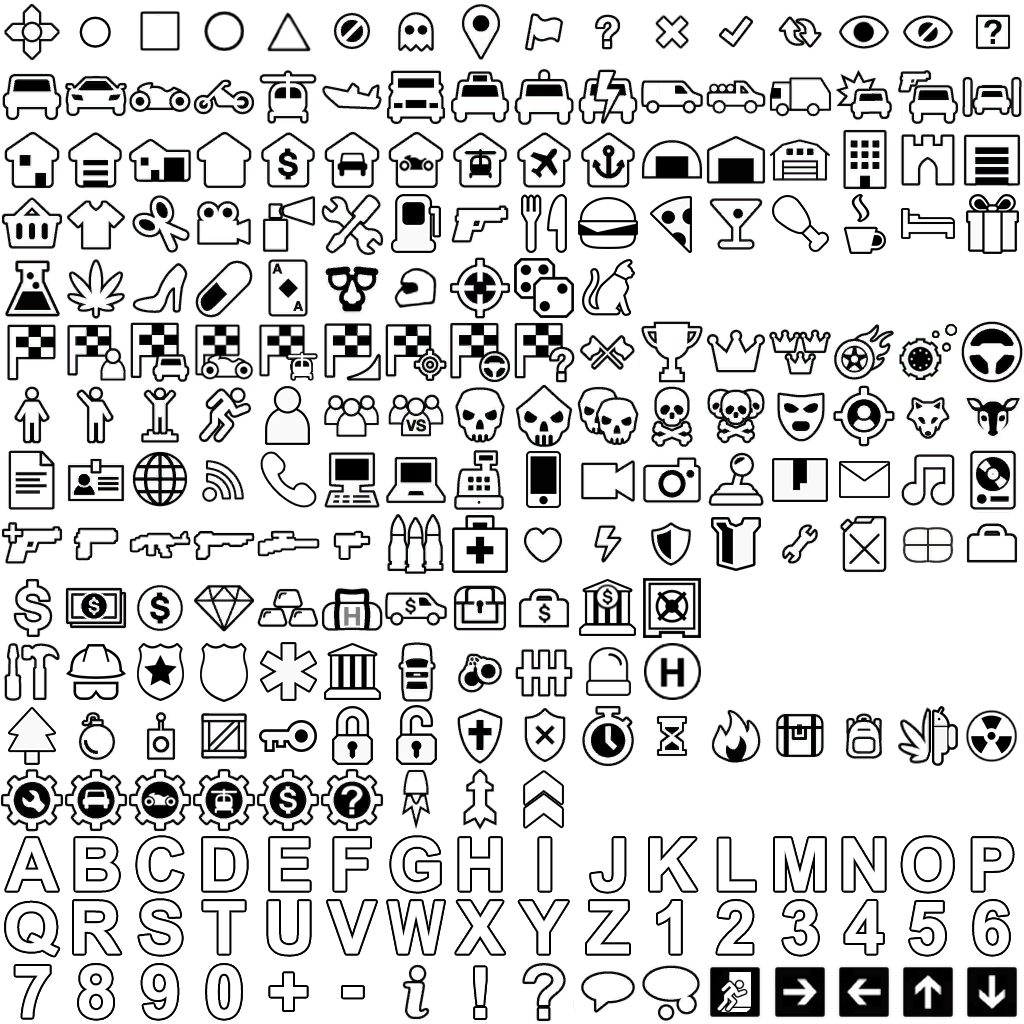
minimap{icon*12,1}
Pro-Tip
Minimap icons and routes are local to the player who triggers them. Use them to create personalized objectives, or waypoints.
Builder Tip
For complex configurations, we highly recommend using the Triggerbox Builder. Simply navigate to the Minimap Function, copy the generated code, and add it to your script - it's much faster and more reliable than writing it yourself!
Advanced
Advanced triggerbox features:
- calltriggerbox{(coords)x,y,z*seconds} - Teleports a code box to the player within a certain time or instantly
- webrequest{link} - Opens an external link, it will ask you if you wanna open it
- webrequest{link*GET} - Grabs the link data and sends it to the game chat
- webrequest{link*POST*format*format} - triggerbox opens the external link and sends a post to a certain database
- ban{reason} - Bans the player from the server with an optional reason
- kick{reason} - Kicks the player from the server with an optional reason
Game Sounds
Sound names usable with sound{name*volume*distance*loop}:
Music
- Beyond
- Fall
- OminousWind
- TheWasteland
- WelcomeToChaos
- ElevatorMusic
- CinematicMusic
- DeadWalking
- MedievalWitcher
- MorganaMirage
- Mysterious
- Mysterious1
- Orchestral
- SpyMusic
- TheChase
Sound Effects
- Cheer
- Tada
- MechanicalMovement1
- MechanicalMovement2
- GarageDoor
- TimeStop
- Fart
- Horror1
- Horror2
- Horror3
- Horror4
- Horror5
- Meme1
- Meme2
- Meme3
- Meme4
- Meme5
- Meme6
- Meme7
- Meme8
- Meme9
- Meme10
- Meme11
- Meme12
- Meme13
- Meme14
- Meme15
- Meme16
- Meme17
- Night
- Notif1
- Notif2
- Notif3
- Notif4
- Notif5
- People
- PoliceRadio
- Siren
- WhiteNoise
Instruments
- PianoC5
- BassAnalog
- FatSaw
- Kick
- Kick808
- Snare
- Snare808
- Hat
- Hat808
- Crash808
- Crash909
- Clap
- Clap808
- ClapPap
Pro-Tip
If you use an external sound file, it is best to keep it as compressed as possible to reduce file size and improve game performance and load time.
HTML Formatting
Triggerbox text commands support HTML-like formatting tags. Click any tag to copy it.
Text Alignment
<align=left>
<align=center>
<align=right>
Text Styles
<b>
<i>
Text Size
<size=20>
<size=35>
<size=50>
<size=75>
Transparency
<alpha=#00>
<alpha=#55>
<alpha=#AA>
<alpha=#FF>
Colors
<color=red>
<color=green>
<color=blue>
<color=yellow>
<color=orange>
<color=white>
<color=black>
<color=#FF5733>
<color=purple>
<color=lightblue>
<color=cyan>
<color=lime>
<color=brown>
Fonts
<font="Pricedown">
<font="Crayon">
<font="Pacifico">
<font="Murderer">
Discord Sprites
<sprite="Discord" index=0>
<sprite="Discord" name="hmm">
<sprite="Discord" index=1>
<sprite="Discord" index=2>
<sprite="Discord" name="kek">
<sprite="Discord" name="laclike">
<sprite="Discord" name="lol">
<sprite="Discord" name="lul">
<sprite="Discord" name="ok">
<sprite="Discord" name="oilup">
<sprite="Discord" name="pog">
<sprite="Discord" index=10>
<sprite="Discord" name="smart">
<sprite="Discord" name="smilingdoggo">
<sprite="Discord" name="spongegar">
<sprite="Discord" index=14>
<sprite="Discord" name="wut">
Default Emojis
<sprite=0>
<sprite=1>
<sprite=2>
<sprite=3>
<sprite=4>
<sprite=5>
<sprite=6>
<sprite=7>
<sprite=8>
<sprite=9>
<sprite=10>
<sprite=11>
<sprite=12>
<sprite=13>
<sprite=14>
<sprite=15>
Pro-Tip
Combine <b> and <color=red> tags for critical gameplay alerts. This tags ensures that important instructions are never missed by the
player during intense action.
Known Bugs
Common issues and workarounds:
- Inventory: when the value 10000001 is reached, it is corrupted.
- HTML: emojis and text fonts sometimes cause errors.
- DL content: videos crash the game.
- Camera: lookat and camsequence sometimes gets freezed.
- Ifcondition: ifcondition{} and mode{stay} sometimes don't behave as expected.
- [server] ban{}, kick{}: Reason parameter is not working (2025 v1.9.2).
- Tags in tip{}: Writing tags in tip{} (e.g.,
[playerid]) incorrectly capitalizes the tag to[Playerid](2024 v1.8). - calltriggerbox{}: Does not provide enough information for if conditions.
- Editor look-at: Effect has issues when combined with condition and loop mode.
Do's & Don'ts
Best practices for triggerbox usage:
Do's:
- Use
cooldown{}ordeactivate{}to avoid spamming triggerboxes.
Don'ts:
- Do not use networked commands on loop as they can spam network messages and break the
game.
and best practice is to useifcondition{}andcooldown{}ordeactivate{}to avoid spamming.
Networked commands such as:
summon{...},chat{...},globalvar{...},explode{},inventory{...},player{...},vehicle{...}